
League Import
NewImport your dynasty league from Sleeper, ESPN, CBS, MFL, or Fantrax
The number one reason dynasty leagues stay on a platform they have outgrown is history. Ten years of champions, rivalries, and blowouts feel like they only exist in one place, so the league stays put.
League Tycoon has a built-in import tool that takes that reason away. Point it at your existing league and it brings over your rosters, settings, future draft picks, team logos, contracts, and up to 20 seasons of league history. Your past seasons come across as real seasons you can browse week by week, not a summary someone retyped from memory.
What Comes Over
Your league, not a blank league with the same name
An import is only useful if it moves the things that took years to accumulate. Here is exactly what League Tycoon brings across.
Teams and owners
Every team name and owner comes over. When your league mates join, they pick their own team from a list instead of waiting on the commissioner to assign them.
Rosters
Every rostered player is matched to a League Tycoon player, including taxi squad and IR placement. A player who cannot be matched never fails the import. It becomes a checklist item you resolve in a few taps.
Future draft picks
Traded and untraded future picks come across with the right owner, at the round depth and pick horizon your source league uses. The 2028 second you acquired two trades ago is still yours.
Settings and scoring
Scoring rules, position scoring overrides, roster slots, divisions, and league configuration are mapped onto League Tycoon settings. Anything with no equivalent is listed explicitly rather than silently dropped.
Team logos
Team avatars are pulled down and rehosted, so your league looks like your league from the first screen.
Contracts and salaries
Importing a salary cap league from MFL, Fantrax, or CBS brings the salaries and contract years with it. Caps larger than League Tycoon's maximum are scaled down proportionally, so a $300,000,000 cap becomes a $3,000 cap and every salary scales with it.
League history
All-time standings, head-to-head records split between regular season and playoffs, past champions as trophies, and all-time weekly high scores.
Past seasons, rebuilt
Up to 20 prior seasons become real, browsable seasons: standings, week-by-week matchups with the actual starting lineups and player stat lines, playoff brackets, and final standings.
League History
Your past seasons come back as seasons, not as a summary
Most migrations ask a commissioner to retype a decade of results into a form. Champions become a list. Everything underneath the champion is gone. League Tycoon rebuilds your past seasons into the same season documents a season played on League Tycoon produces, which means the app renders them the same way.
Browsable past seasons
Pick a year from the season dropdown and it behaves like any other season in the app.
- •Final standings and regular season records
- •Every week's matchups, with the starting lineups each team actually used
- •Player stat lines and points inside those matchups
- •Playoff brackets, including how each round played out
- •Up to 20 seasons per league
A Hall of Fame built from that history
The same import populates your Hall of Fame so the all-time view is right on day one.
- •All-time standings with points for and against
- •Head-to-head records, regular season and playoffs tracked separately
- •Trophies for past champions, runners-up, and third place
- •All-time weekly high scores
- •Everything stays editable, so a commissioner can correct anything
Franchises are followed, not just names
Dynasty teams rename themselves constantly. When history is imported, each historical team is matched to a current team by owner first, then by the source platform's team identity, then by name. A franchise that has been called four different things over eight years still keeps one continuous all-time record.
Supported Platforms
What you need for each platform
Most imports need nothing more than a link to your league. Private leagues need one credential so League Tycoon can read what your account can already see.
| Platform | What you need | Notes |
|---|---|---|
| Sleeper | Your Sleeper username, or a link to the league | Sleeper's league data is public, so no password is involved. Past seasons are followed automatically through the league's previous-season chain. |
| ESPN | A link to the league. Private leagues also need your espn_s2 and SWID cookies | Public ESPN leagues import from the link alone. History from 2018 forward is generally reachable; older seasons need the cookies from a member account. |
| CBS | A link to the league plus your CBS email and password | The password is exchanged for a session token on our servers and is never stored. CBS support is in beta. |
| MyFantasyLeague | A link to the league or the league ID. Private leagues also need your MFL login | The MFL password is never stored, only the short-lived session cookie it returns. Salaries and contract years import directly on contract leagues. |
| Fantrax | Your Fantrax Secret ID from your profile, or a link to the league | Salaries and contract years import directly. Fantrax does not expose playoff and waiver configuration, so those two land on your review checklist. |
| Anywhere else | Your league name and team count | The guided manual path builds the league shell and hands you a setup checklist, so a league on a platform without an API still starts from something instead of nothing. |
Credentials are used once
Credentials for private leagues are encrypted at rest, used for the single import that needs them, and deleted the moment it finishes. Abandoned imports are swept automatically. CBS and MyFantasyLeague passwords are exchanged for a session token on our servers and are never stored.
Why Yahoo is not on the list
Yahoo's fantasy API has no route that works without an approved developer application, and approval is not something we can count on. Rather than ship a Yahoo tile that fails at the last step, we left it off. Yahoo leagues can use the guided manual path.
How It Works
Five steps, and you see everything before you commit
Point League Tycoon at your league
Open Tools, choose Import League, pick your platform, and paste your league link or username. Private leagues ask for the one credential that platform requires.
Choose what you are importing into
Pick standard dynasty or contract dynasty, and choose how many past seasons to bring over, up to 20.
Review the preview
Before anything is created you see every team, the roster counts, how many players matched, a summary of the scoring and roster settings being mapped, anything that will not carry over, and which teams would land over the salary cap.
Run the import
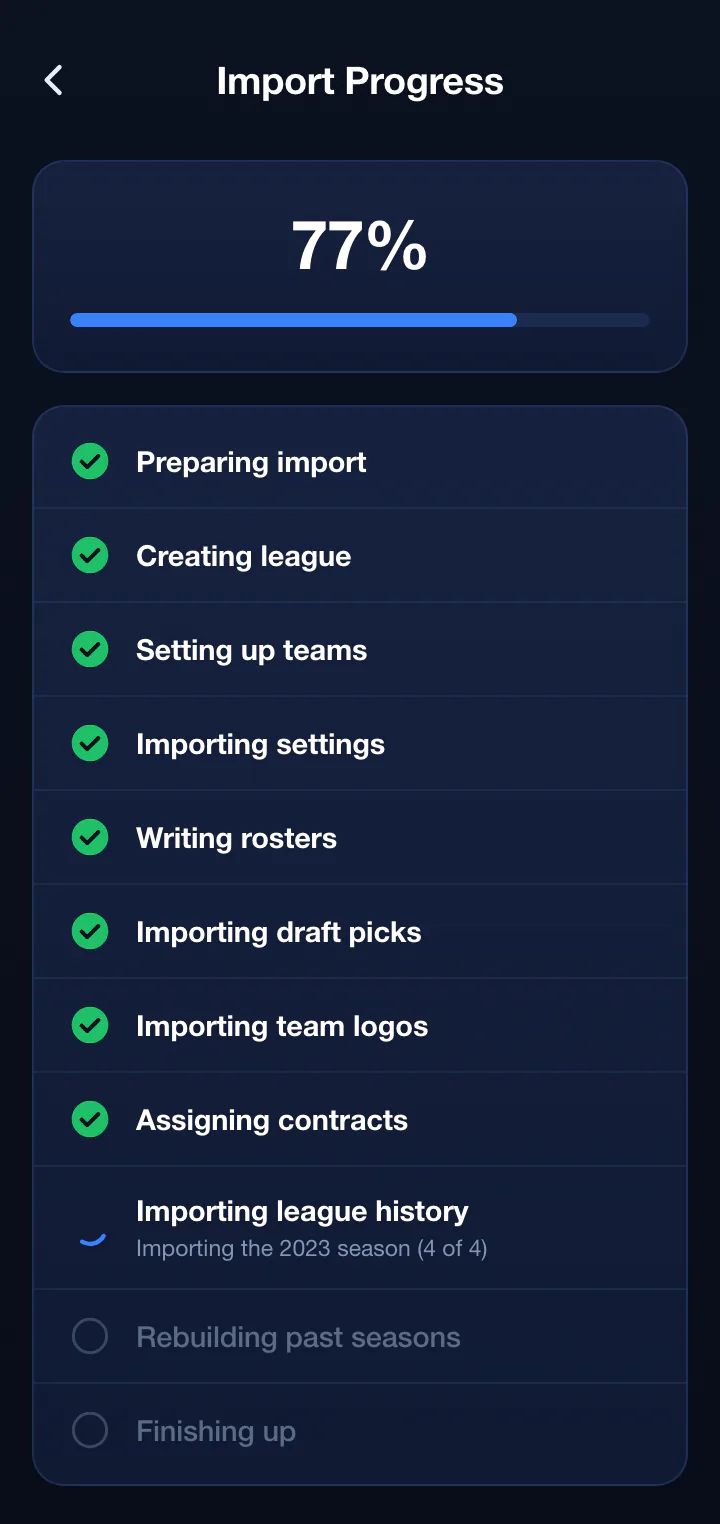
League Tycoon creates the league, sets up teams, applies settings, writes rosters, transfers future draft picks, brings over team logos, assigns contracts, imports league history, and rebuilds your past seasons.
Work the checklist and invite your league
The league opens with a checklist of anything worth a human decision. Share the invite link and each league mate claims their own team.
What the import runs through
- •Preparing import
- •Creating league
- •Setting up teams
- •Importing settings
- •Writing rosters
- •Importing draft picks
- •Importing team logos
- •Assigning contracts
- •Importing league history
- •Rebuilding past seasons
- •Finishing up
Every step reports live progress, down to which season is being rebuilt. If the job is interrupted it resumes from the last completed step instead of starting over.
After The Import
A checklist instead of a guessing game
No import from a different rules engine is going to be perfect, and pretending otherwise just moves the surprise to week three. League Tycoon opens your imported league with a checklist of everything worth a human decision, and every item deep links straight to the screen that fixes it.
- •Players that could not be matched, with suggested candidates
- •Scoring rules to confirm, including anything with no direct equivalent
- •Roster settings, playoff format, and waiver rules to review
- •Contract years and contract rules on contract leagues
- •Teams that landed over the salary cap, if any
- •Hall of Fame entries to adjust
- •Invites to send
Being Straight With You
What an import does not do
It does not drop you into a half-played season
Imports always target your next fresh League Tycoon season. Schedules are regenerated, and source standings land in your past seasons and Hall of Fame rather than on new team records.
It does not invent rules that do not exist
Scoring rules and roster slots with no League Tycoon equivalent are reported to you by name instead of being silently approximated.
It does not touch your old league
The import reads from your current platform and writes only to League Tycoon. Your existing league is completely unchanged.
It does not depend on every platform being generous
Fantrax does not expose playoff and waiver configuration through its API, so those become review items. ESPN leagues that have been reactivated onto ESPN's newer platform can lose access to their own past seasons, and the preview tells you that before you commit.
Platform Guides
Switching from a specific platform
Each guide covers what changes for your league, what the import brings across, and how to get your league mates on board.
Switch from Sleeper
Import with a username or a league link. No password, and history follows the previous-season chain automatically.
Switch from ESPN
Import a public ESPN league from its link, or a private one with the espn_s2 and SWID cookies from your account.
Switch from CBS
Import a CBS league including salaries and contract years, using a league link and your CBS login.
Switch from MyFantasyLeague
Bring a long MFL history and an existing salary cap structure onto a platform with no spreadsheets attached.
Switch from Fantrax
Import with your Fantrax Secret ID, including salaries and contract years from a Fantrax salary cap league.
General migration guide
The commissioner playbook for moving a dynasty league, including how to get buy-in from skeptical league mates.
FAQ
League import questions
Which fantasy platforms can League Tycoon import from?
Does my league history come over when I switch platforms?
Do my traded future draft picks come over?
Do salaries and contracts import from a salary cap league?
How long does an import take?
What happens to players the import cannot match?
Does importing change my old league?
What does not carry over?
Do I have to commit before I see what the import will do?
Is my password stored?
Bring your league, and your league's history, with you
Import from Sleeper, ESPN, CBS, MyFantasyLeague, or Fantrax. Review the preview before anything is created. Standard dynasty is completely free.